Wireless Weighing Scales
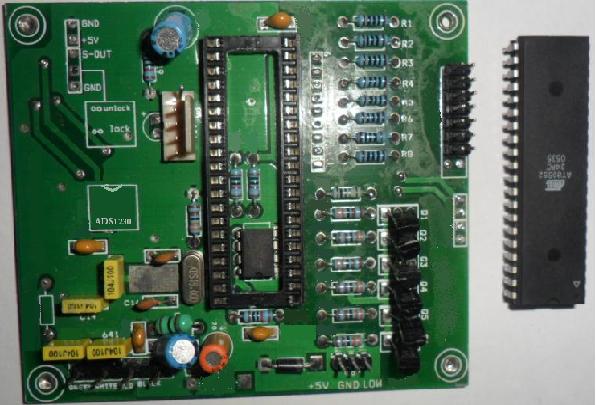
If you are using a card similar to the one above (using ADS1230) then we are offering a wireless conversion software and supporting wireless modules for it.
How does it work?
One of the above cards (without any display connected) is put inside a suitable sized junction box with battery connected to it and it stays inside the platform weighing scale. This card is connected to the load cell. Then you replace the existing chip with the one supplied by us and connect wireless transmitter (supplied by us) to this card as per connection diagram supplied.
Another same card is installed inside an indicator box ("Head Work") with seven segment display and our chip installed. This card reads data from the base and displays weight.
How can I calibrate the scale?
You can calibrate the scale with switches on Indicator box.
Can I use it for both Platform scales and Table top scales?
There are 2 versions. The one explained above is suitable for platform scales bigger than 150 Kgs (as there is no display supported on transmitter end so even if you install one it will not display anything) Calibration & normal operations requiring switches (ZERO/TARE/N-G etc) are only connected on Indicator. In this case calibration parameters are also stored in memory of Indicator.
In case of Table Top scales, there is another version in which display and switches are connected at both Table Top and second display but calibration can only be done at Table Top end. Calibration parameters are stored in memory of Table Top card.
Switches on the second display can only be used to Zero/Tare the scale (if this function is not required then simply do not connect the switch to the card used as second display).
Whats the range of wireless used?
Its normal range is about 25'-30' (about 10 meters). In some cases this can go even up to 40' (depending on noise level).
What do we supply when you place an order?
We supply:
- 2 chips running our software (Marked 'T' and 'S').
- 1 wireless transmitter and 1 wireless receiver.
- Calibration manual.
- Connection diagram
I am not using this card as shown in picture above. Can I still use your technology somehow?
Yes. For that to happen you will have to send your card to us and we will modify our software to adapt to your indicator card.
If it is only a matter of using two cards instead of one and replacing chips & connecting wireless modules then does it mean that i can even upgrade the scales i have already sold to my customer.
Yes you can and as you can imagine there is a very big business for it.
Contact.
FOR ENQUIRIES PLEASE SEND AN EMAIL TO sales@wirelessweighingscales.com
© Copyright 2012 WirelessWeighingScales.com